
Word Coach
Fix the word you got wrong.Hear exactly why.
Knowing a word was wrong doesn’t fix it. Word Coach shows you how to fix pronunciation mistakes one word at a time: what you said, what you meant, the sound that separated them — and a loop that keeps going until the red turns green.
OPEN THE SLIP
Tap the red word. See what actually happened.
Every flagged word in a take opens into Word Coach. It shows the word the way you said it next to the way it should sound, marks the exact sound that slipped, and gives you a short, plain-English tip on how to fix it. No grammar lesson, no symbol chart.
- The flagged sound, marked inside the word
- A short “how” tip you can act on straight away
- Step through every flagged word in the take, one after another
- What you tend to say instead, so the habit has a name
A screenshot of the actual correction screen drops in here.
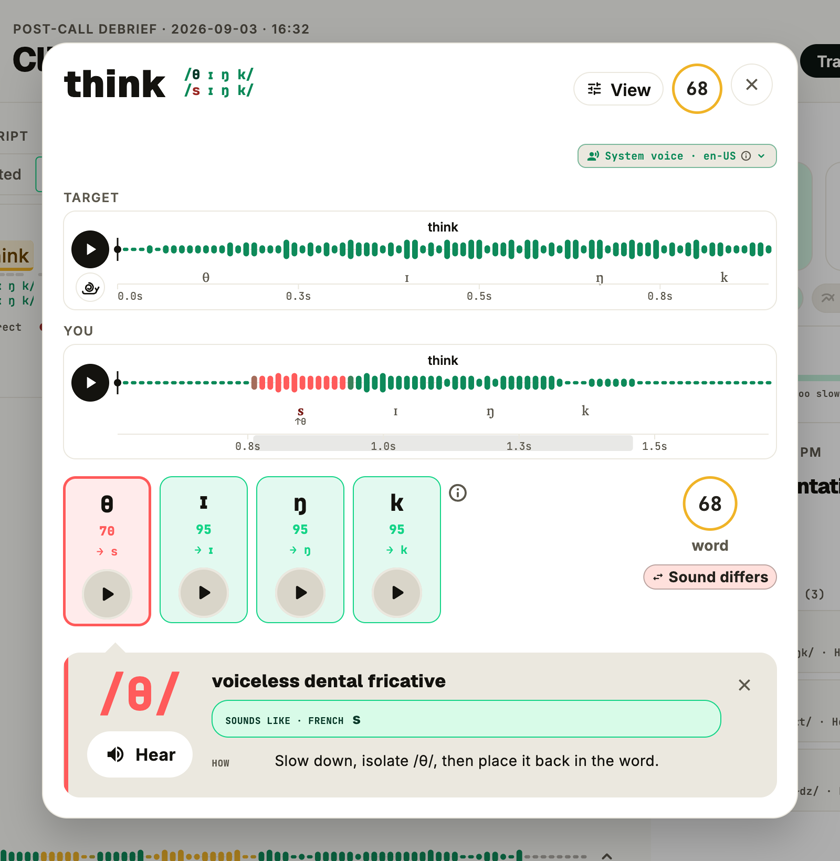
think
you said sink · meant think
HOW
Rest your tongue lightly between your teeth and let the air through — don’t let it touch the roof of your mouth.
HEAR IT
The target and you, side by side.
Play the word as it should sound, then play your own. A reference voice sits right next to your recording, so the difference stops being a feeling and becomes something you can hear — and copy.
- A reference voice for the language you are learning
- Your own take of the same word, one tap away
- Replay either as many times as you need
- Sound pairs like think / sink to train your ear
THE LOOP
Say it again until it turns green.
Fixing a sound takes reps, not a lecture. Say the word again and every attempt is scored, so you can hear it improve. The slips that keep coming back are collected in your errors library and turned into short drills — until the sound is one you don’t have to think about.
- Every retry scored, so progress is visible
- Recurring slips collected automatically, not by you
- “Train this” turns a slip into a focused drill
- Back in your next take, you’ll see if it stuck
- th↑ 12
the “th” in think
47 slips · last 30 days
- r↓ 4
the “r” in right
31 slips · last 30 days
- th↑ 8
the “th” in this
22 slips · last 30 days
- ee↓ 9
long vs short “ee” (sheep / ship)
14 slips · last 30 days
- a↓ 11
the “a” in cat
5 slips · last 30 days
Privacy
Your voice stays on your machine.
Audio is analyzed locally. No upload, no cloud transcripts, no training on your speech. The models ship with the app and run on your CPU or GPU.
- End-to-end local
- No upload, ever
- Runs on your Neural Engine
- Never used to train models
Pricing
One coach. No appointment.
FAQ
Questions about fixing pronunciation mistakes
How do I fix a pronunciation mistake I can’t hear?
That is exactly what Word Coach is for. It marks the sound that slipped, lets you play the target and your own take back to back, and gives a short tip on how to change it. Then you say it again and see whether the mark turns green.
Whose voice is the reference?
A clear, synthesized reference voice for the language you are learning — the same target the scoring is built around. It can say any word, instantly, on your device.
Do I need to know phonetics?
No. Word Coach talks about words and sounds (“you said sink, you meant think”), never about symbols. If you want more detail, you can switch on a transcript in your own language.
Does Word Coach remember my mistakes?
Yes. Slips that repeat are counted in your errors library, most costly first, and feed the drills the app suggests next. Sign in and the list follows you across your devices.
Features
- Learning pathStart hereA step-by-step pronunciation course, from first sounds to clear speech.
- Text libraryPaste your own text, find one by topic, or generate one on-device.
- ProgressThe same line, better every take — plus a streak worth keeping.
- Read & scoreRead a line or speak freely — see which words gave you away.
- My PitchNewRehearse the talk you actually have to give, with a teleprompter.
- Ear trainingLearn to hear the difference first — no microphone needed.
- All featuresA pronunciation coach broken down into the parts that matter.
Turn your worst word into your best one.
Record one sentence, tap the word that went red, and fix it before your next conversation.