
My Pitch
Rehearse the talk youactually have to give.
Generic exercises don’t prepare you for the sentence you will say on Tuesday. My Pitch lets you rehearse your pitch or presentation with a teleprompter — your real scripts, from the investor pitch to the interview answer to the wedding toast — and scores every take.
YOUR SCRIPT
Bring the words you actually have to say.
Paste or type the text you need to deliver and it becomes a pitch you can come back to. Keep them in folders, tag them, pin the one you are rehearsing this week — your scripts, organized the way the talks in your calendar are.
- Paste or type any script, long or short
- Folders and tags for interview prep, talks, everyday lines
- Pin the one you are rehearsing now
- Search across everything you have saved
- Good morning. I’m Ana, and I run product at Northwind.
- We think this changes everything about how
- ambitious people learn languages.
- Last quarter we grew to forty thousand learners,
- and we did it without a single paid channel.
- BEST
- 82
- LATEST
- 79
- ATTEMPTS
- 6
We think this changes everything about how ambitious people learn languages.
you said “sink” — meant “think”
TELEPROMPTER
A prompter that follows you, not a metronome.
The text scrolls with your voice instead of at a fixed speed, and it keeps the end of the sentence in view — so you can see the whole line coming and get the intonation right, instead of reading word by word off a marching line.
- Scrolls to where you actually are, not to a preset speed
- Keeps the rest of the sentence visible for intonation
- Moves smoothly — no jump when a line ends
- Karaoke-style: you read, it records, nothing to juggle
TAKES
Every rehearsal, scored the same way.
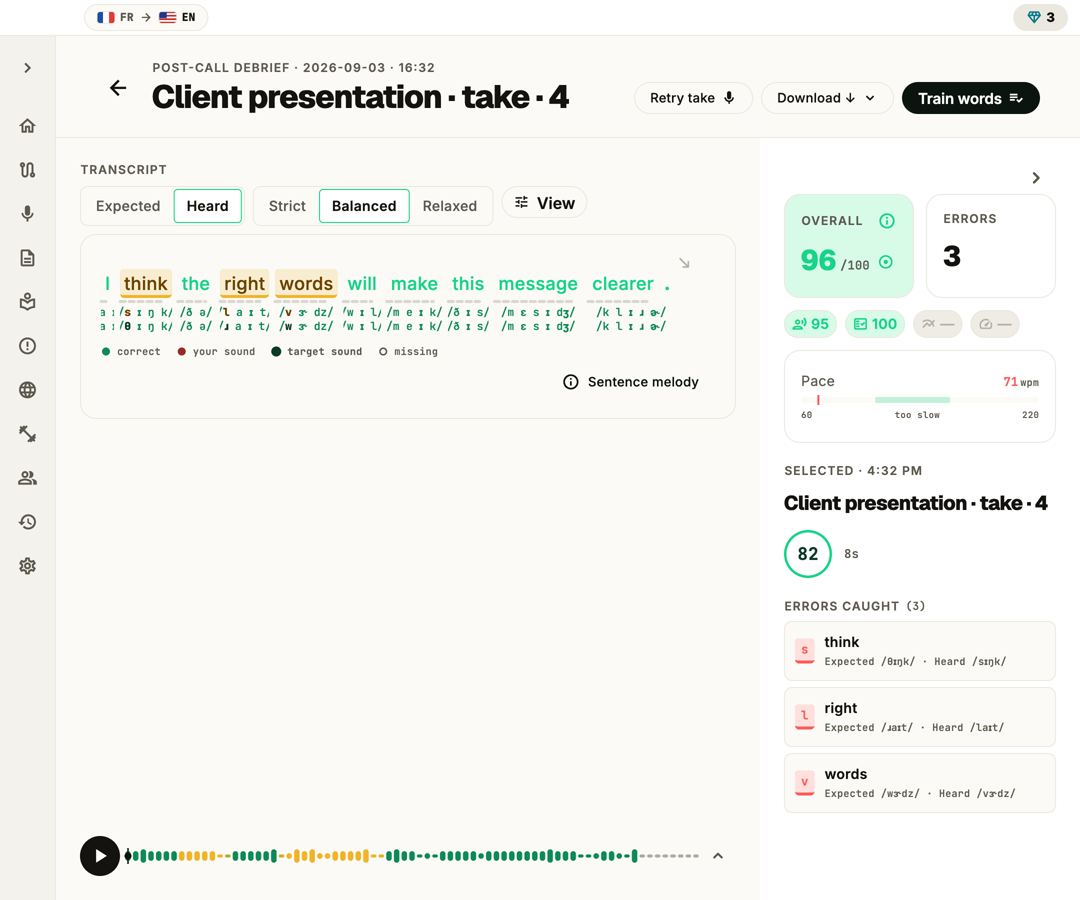
Each take lands on the same review screen as any other recording — the same clear/close/off marks, the same slips ready to fix in Word Coach. Because the script doesn’t change, you can watch attempt six beat attempt one on the words that matter.
- Best, latest and attempt count kept per pitch
- A timeline of takes, so progress is a line, not a feeling
- Jump straight from a take to the slip that caused it
- Rehearse again the moment you have fixed it
A screenshot of the actual correction screen drops in here.
Privacy
Your voice stays on your machine.
Audio is analyzed locally. No upload, no cloud transcripts, no training on your speech. The models ship with the app and run on your CPU or GPU.
- End-to-end local
- No upload, ever
- Runs on your Neural Engine
- Never used to train models
Pricing
One coach. No appointment.
FAQ
Questions about rehearsing a pitch
Can PronounceFit listen during the real presentation?
Not yet. My Pitch is for rehearsal: you record a take and review it afterwards. Catching slips while you give the real talk or call is on our public roadmap, not in the app today.
How long can a pitch be?
Long enough for a real talk. The prompter is built for full scripts, and you can stop and restart a take whenever you want — no need to get through it in one run.
Are my scripts private?
Yes. By default your pitches stay on your device, and their recordings always do. If you want your scripts on your other devices too, syncing personal texts is an opt-in setting — off unless you turn it on.
Does the teleprompter work in every language?
My Pitch works in all 29 practice languages. Scoring is fully supported in English, French, Russian and Spanish; the others are in early access.
Features
- Learning pathStart hereA step-by-step pronunciation course, from first sounds to clear speech.
- Text libraryPaste your own text, find one by topic, or generate one on-device.
- ProgressThe same line, better every take — plus a streak worth keeping.
- Read & scoreRead a line or speak freely — see which words gave you away.
- Word CoachOpen any slip: what you said, what you meant, and how to fix it.
- Ear trainingLearn to hear the difference first — no microphone needed.
- All featuresA pronunciation coach broken down into the parts that matter.
Your next talk deserves a rehearsal.
Paste the script you are already nervous about and run it once. The slips that matter will be waiting when you stop.